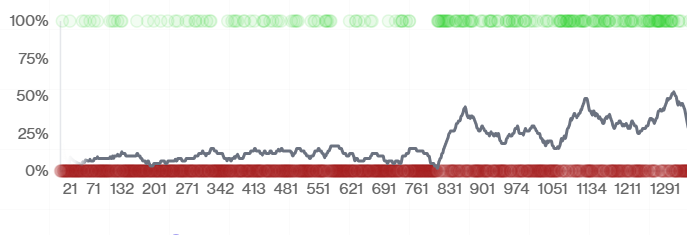
At hud, my coworker and I built an RL environment for ops diagnostics: one that lets agents investigate across Sentry, Supabase, Railway, and Kubernetes. We trained a model on 24 real production tasks and saw a 2x improvement.
As engineers at a fast-growing startup, a solid 10-20% of our time is taken up by debugging bugs in production. The way bugs are solved in production is pretty mechanistic:
After doing this a few dozen times, we pondered why we couldn't just have an agent do it, or at the very least assist. The reason is simply that it doesn't have access to the environment, and without the correct prompt or RFT the agent won't be able to intuitively fix bugs the way we can.
This resulted in us getting rabbit-holed and creating an agent trained on our production data that can debug Sentry errors. The naive implementation of giving an LLM access to 104 tools didn't work, so we created an architecture that involved multiple environments accessible via subagents.
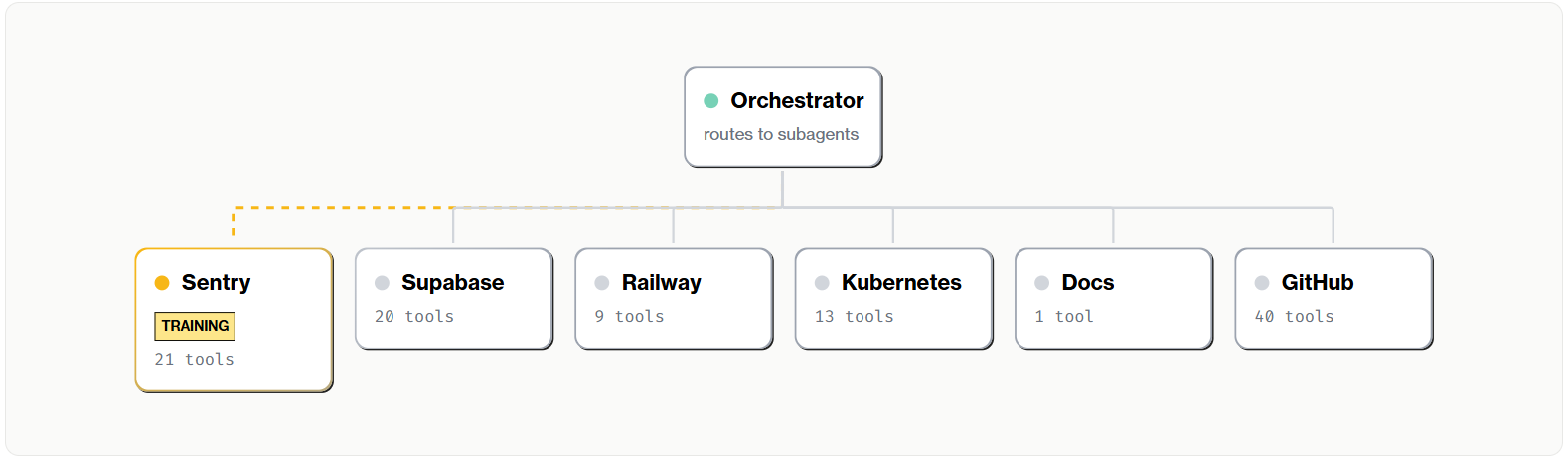
The insight is simple: don't give one agent all the tools. Instead, create an orchestrator environment where the agent's tools are subagents—a Sentry agent, a Supabase agent, a Kubernetes agent. The orchestrator sees just six tools, one per subagent. Behind those six tools are 104 individual MCP tools across all subagents.
Here's the key insight: each subagent is itself an RL environment. The Sentry subagent has its own scenarios, its own tools, its own reward signal. You can train it independently on Sentry-specific tasks. Same for Supabase, same for Kubernetes. Once each subagent is trained, you compose them into the orchestrator environment.
Train the subagents first. Then train the orchestrator.
We're releasing this architecture as a public HUD environment called cross-service-diagnostics (GitHub). Plug in your production API keys—your Sentry token, your Supabase credentials, whatever services you use—and you have an ops diagnostics agent for your stack. Fork it, modify it, train on it.
But an environment alone isn't enough to train an agent: we need to generate tasks. We started with the Sentry subagent.
To train the Sentry subagent, we sourced 24 tasks from our actual Sentry instance—real issues from our production systems across different services, error types, and severity levels. Schema validation failures, rate limiting, auth token expiration, WebSocket disconnects, billing edge cases. The diversity matters for generalization.
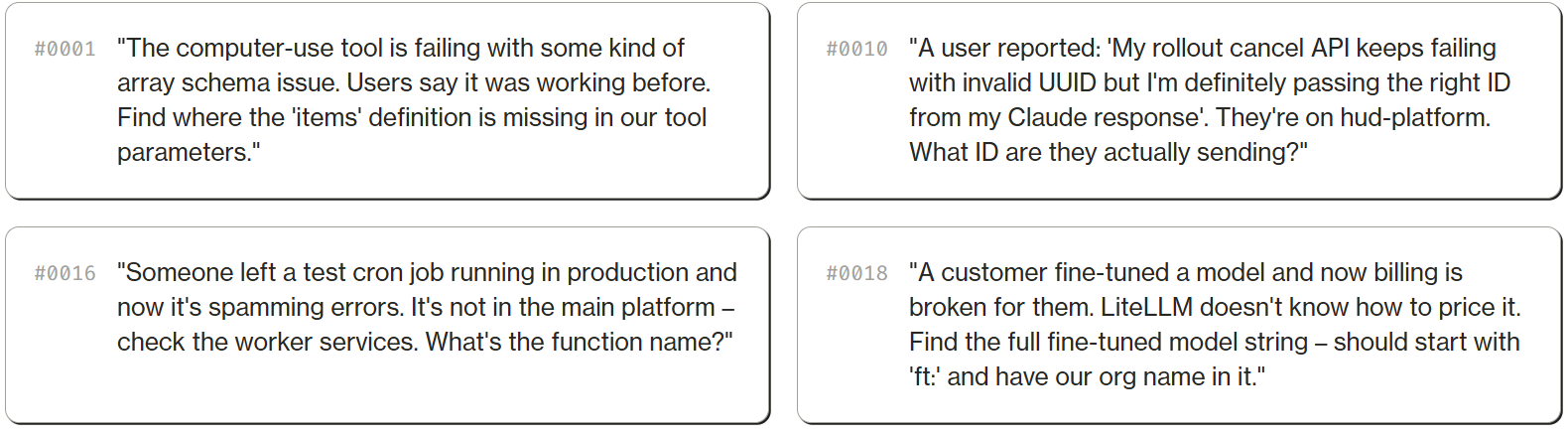
Each task has a verification criterion – specific facts the agent must surface (like an issue ID, a team UUID, or a specific error message) and facts it must not confuse with similar issues. Binary verification: did the agent find the exact right needle in a very large haystack?
The answers come from real production data. Task #0010 expects the agent to find that the user was passing toolu_01XArLykPgwrg24DR3WQJ3Mu – a Claude tool call ID – instead of a trace UUID. Task #0016 expects it to find the function print_hello.
With 24 verifiable tasks and an environment, we can run reinforcement learning. Even a small dataset, if diverse enough, can meaningfully optimize a subagent – though a single environment can scale to 500 tasks or more. On HUD, you go to Models, fork a base model (we used o4-mini), then click Train. Point it at your taskset and environment. The platform handles the rest—running rollouts, collecting trajectories, and sending them to the RL backend for training (see the training docs).
HUD supports two training backends: OpenAI RFT (o4-mini) and Tinker (Qwen3 235B, Deepseek V3.1, Kimi K2, and more). Each training run creates a versioned checkpoint on your model, so you can track results and compare across runs.
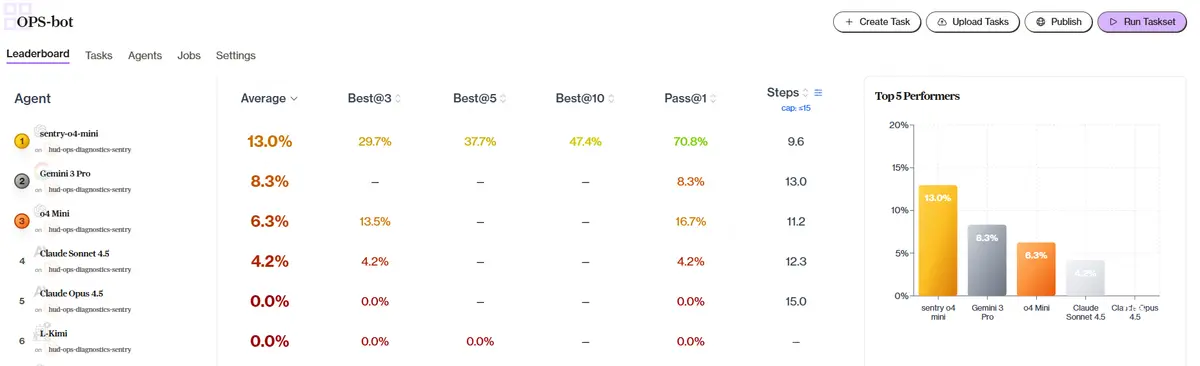
We trained using OpenAI RFT with o4-mini. Training took around 13 hours and ran through 3,000+ traces. At 15 steps max per scenario, the trained model sentry-o4-mini performs 2x better than base o4-mini (13% vs 6.3%) on our harder Sentry tasks, and beats Gemini 3 Pro and both Claude models—in fewer steps.
This pattern—training on domain-specific tasks to create fast, specialized tools—has improved performance across our other projects too: deep research agents, coding assistants, bug investigation. More case studies coming soon.
This environment teaches us principles that apply beyond ops diagnostics – to any RL environment for tool-using agents:
We're releasing this RL environment publicly. You can explore the scenarios, connect your own MCP servers, and run diagnostics against your own production stack.
Every trace on the platform captures the full trajectory – actions, observations, tool calls, and reasoning. You can replay exactly how the agent investigated each issue.
If you have thoughts or questions, please reach out at dylan@hud.so.